Build a form with a workflow
Every submission runs a workflow you can see: conditions, branches, waits and approvals, then emails, notifications and your other tools. Free on every plan.
A form collects an answer. A workflow decides what happens to it. In most tools that second part lives somewhere else, in an automation service with its own login, its own bill and its own idea of what a form is. Here the workflow is part of the form, drawn as a diagram next to it, and it runs on the free plan.
What starts it
A submission. Every response the form accepts runs the workflow once, with all the answers available to every step. That’s the trigger today; the engine is built so others can follow.
What it decides
Logic steps read the answers and shape the path:
- Condition: a yes/no test on any answer (“total over 500”, “country is not NL”, “verified is No”), with a branch for each outcome.
- Route: several branches, each with its own rule, and one default for everything else. Regions to regional teams, product lines to owners.
- Wait: pause for a set time before the next step. A reminder two days later, a follow-up a week after.
- Approval: hand the submission to a person. Reminders while they sit on it, escalation to someone else when they still do, and send back for changes, which mails the respondent a link to fix their answer and runs the workflow again from there. Approvals are the one Pro step.
What it does
Action steps carry the answers out of the form:
- Email the respondent, your team, or an approver, with any answer piped into the subject and body.
- Your tools: send the response to a spreadsheet, post to a chat channel, text a phone, or call any URL with a webhook you shape yourself. Connect each once for the team; every workflow can then use it.
The list of tools grows; the workflow doesn’t care which one is at the end of a step.
How it behaves
- Visual builder. The workflow is a diagram: trigger at the top, steps and branches below. What you see is what runs.
- Test runs. Run the workflow against sample answers before anyone submits, and see each step’s result.
- Run history. Every submission has its run: which steps ran, which branch it took, what each tool answered, and where it’s waiting.
- Published versions. Editing never touches a live workflow. Publish when you’re ready; running submissions finish on the version they started on.
- Failures don’t disappear. A tool that’s down is retried; a connection that keeps failing pauses with the reason shown on the step, and resumes when you fix it.
A client intake form, end to end
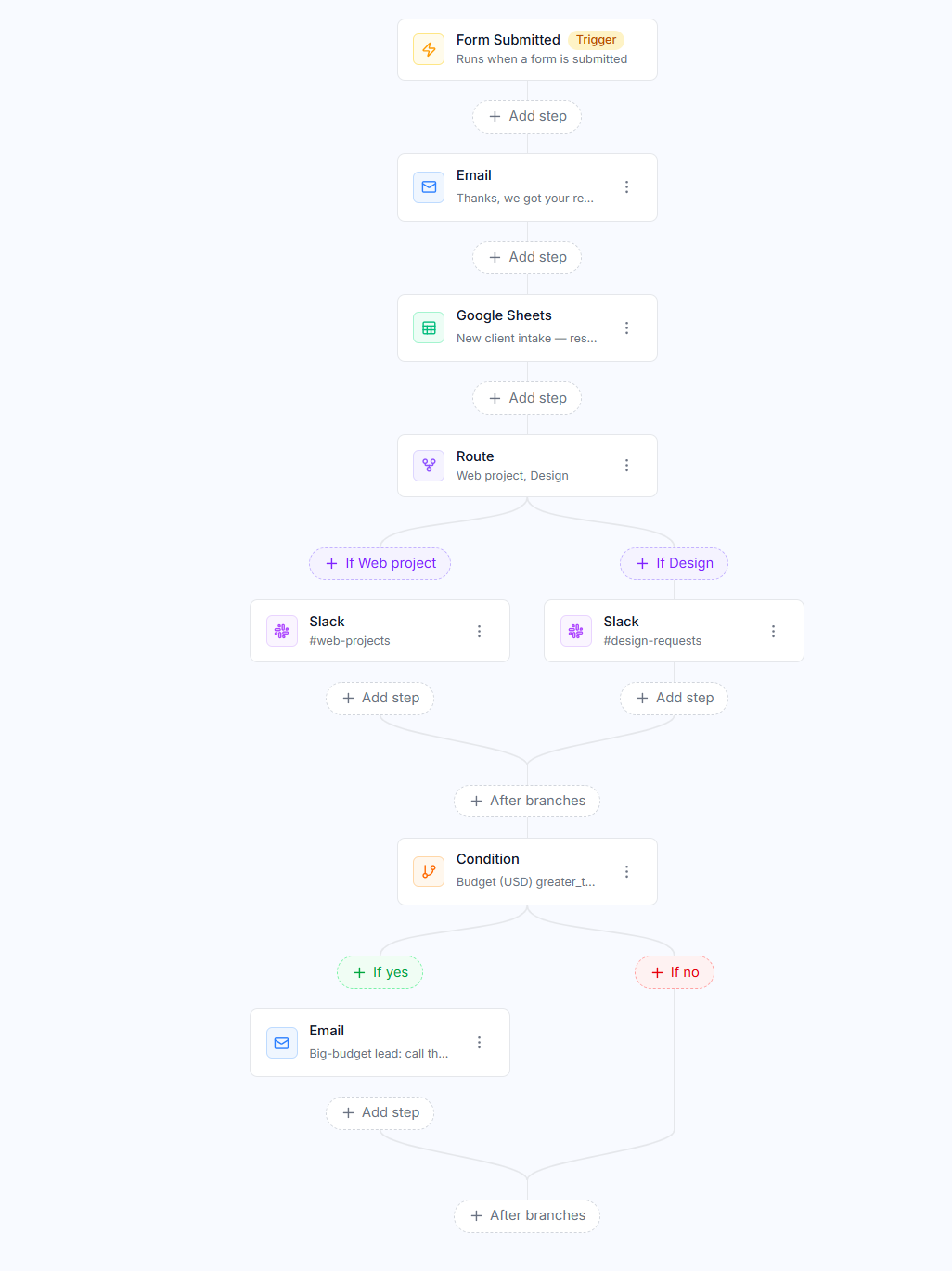
A new-client form with the client’s details and what they need.
- Email the client a confirmation, with their name and the service they picked filled in.
- Send the response to the team’s spreadsheet.
- Route on the service: web projects to one channel, design to another.
- Condition on the budget: over a threshold, email the sales lead straight away.
Four steps, no code, nothing to keep in sync with another tool, and the whole path visible on one screen.
Good for
Anything where a submission is the start of work rather than the end of it: intake and onboarding, quote and purchase requests, registrations that need a confirmation and a seat count, support and maintenance requests that must reach the right person, and any form whose answers currently get copied into somewhere else by hand.